Ontology
Mirrored from
iblai/ontology·README.md. This page is generated — edit it in the repository, not here.
One ontology of the institution, exposed to agents over MCP. Connect the systems a campus already runs, dissect them into business terms and relationships, certify the result, and publish it as MCP servers that ibl.ai agents, Claude, Codex and any other MCP client can call. Runs inside your network, signs in with ibl.ai, and keeps no database of its own.
Status: the console works against the three systems it is built on: ibl.ai (sign-in, roles, API keys, agents), the NVIDIA auto-ontology engine and Google MCP Toolbox. It has not yet been run against a live platform, engine or runtime; docs/plan.md says what is unverified. Demo mode still serves the fixed data in
lib/mock.ts.
Quick start
On one host, as a developer runs it: the console's pages and its server half (the host API, the MCP gateway, Toolbox and their files) on one origin.
Start the engine from a checkout of NVIDIA/auto-ontology. Fill in its
.envas its README says, but setAPP_URL=http://localhost:3100and leaveCONNECTION_STRINGSempty. The override runs the engine on the host's network (a Linux host), with its web app on127.0.0.1:3100and every service listening on loopback only, so a database on this machine is reached at127.0.0.1by the engine and by the console alike (Docker Compose 2.24.4 or later):docker compose -f docker-compose.yml -f <this repo>/deploy/auto-ontology.override.yml up -d --buildGive the console the engine's key, one of two ways. Sign in at http://localhost:3100 as the engine's admin, open the user menu → API Tokens → New token, and copy it into
AO_API_KEY(it is shown once; an admin's token is needed for the model export). Or leaveAO_API_KEYout and setAO_ADMIN_EMAIL,AO_ADMIN_PASSWORD_FILE(a file holding the admin's password) andAO_ORIGIN=http://localhost:3100: the console then signs in as the admin and makes its own key on the first call that needs the engine.Start the console:
pnpm install cp .env.example .env.local # set ONTOLOGY_PLATFORM, and AO_API_KEY or the admin's sign-in pnpm dev # http://localhost:3000 → signs in with ibl.aiONTOLOGY_PLATFORMis the key of the ibl.ai platform the engine belongs to. WithAO_URLset and noONTOLOGY_PLATFORMthe dev server refuses to start. Any other platform you sign in to is answered403"This server serves another platform."
One engine serves one platform. To serve several from one host, leave AO_URL and
ONTOLOGY_PLATFORM unset and write each platform's engine, on another machine, to
$ONTOLOGY_HOME/platforms/<platform>/engine.json as {"url": "...", "key": "..."}
(docs/network.md).
Without an ibl.ai account, run in demo mode (fixed session, SDK panels show a notice):
NEXT_PUBLIC_DEMO=1 pnpm dev
node scripts/screenshots.mjs      # regenerate docs/screenshots (demo server running)
node scripts/audit-layout.mjs     # check every page at 375–1920px for broken layout
Sign-in returns only to origins on your platform's allowed redirect origins on ibl.ai; add
http://localhost:3000 and the deployed hostname there.
Install on a server
A platform's server serves the whole console at https://<host>/: the pages, the host API and the
MCP gateway, which agents call at https://<host>/<platform>/<slug>/mcp. The console is built on
the server from this repository and run by systemd
(deploy/iblai-ontology.service); NVIDIA's engine with its
database, and Caddy for TLS, run beside it in Docker
(deploy/compose.yaml). Nothing of ibl.ai's arrives as a prebuilt image.
docs/install.md is the whole install: four blocks to paste on a fresh Ubuntu
server. ONTOLOGY_PLATFORM, in the .env beside compose.yaml, names the ibl.ai platform the
server's engine belongs to, and nothing starts without it; ONTOLOGY_HOST is the name the server
answers at.
Looking after the server is in docs/operations.md, which also covers
running the console as ibl.ai's prebuilt image instead (COMPOSE_PROFILES=console, with the
optional deploy/install.sh). What talks to what is in docs/network.md.
The pages can also be hosted elsewhere. Built with NEXT_PUBLIC_ONTOLOGY_RELAY=1, the console
serves pages only (ontology.iblai.me for staging) and forwards every /api/host/* call to the
platform's server at https://<host>/iblai, which an administrator connects under Connect a
server.
Releases
Every push to main prepares a release. release-it takes the version and the
CHANGELOG.md entry from the conventional commit subjects since the last v* tag: a
breaking change is a major, feat: a minor, anything else a patch.
The workflow then stamps that version into compose.yaml and
install.sh and attaches both to a draft release.
The console's image is not built on GitHub. It is built from the release's tag and pushed to ECR by
hand, and the release is published after it, so nobody downloads a compose.yaml whose image does
not exist:
version=<the draft's version, without the v>
image=public.ecr.aws/ibleducation/iblai-ontology
docker build --platform linux/amd64 --provenance=false --tag "$image:$version" \
  "https://github.com/iblai/ontology.git#v$version"
aws ecr-public get-login-password --region us-east-1 |
  docker login --username AWS --password-stdin public.ecr.aws
docker push "$image:$version" && gh release edit "v$version" --draft=false --latest
The ECR repository is created once (aws ecr-public create-repository --repository-name iblai-ontology --region us-east-1). A draft whose image is never pushed is deleted, not published.
No tag is made by hand but the baseline: v1.0.0 is pushed together with the commit it names.
A server that builds the console from source (docs/install.md) needs none of
this: it follows main, for the source and for compose.yaml alike.
Documentation
Using the console
| Document | What it covers |
|---|---|
| docs/console.md | Every page with screenshots, and what each control does |
| docs/guides/connect-data-sources.md | Adding databases and HTTP APIs: read-only logins, scope, PII, what Connect & Dissect does, troubleshooting |
| docs/guides/permissions.md | Policies and toolsets, sign-in methods, row-level restriction, PII, writes, origins, audit |
| docs/guides/connect-agents.md | Attaching ibl.ai OS agents; Claude Desktop and Claude Code, Codex, Cursor, Python, cURL |
Architecture and operations
| Document | What it covers |
|---|---|
| docs/install.md | Installing the console on a platform's server: four blocks to paste on a fresh Ubuntu |
| docs/operations.md | Looking after that server: settings, a model, upgrades, backups, the console as an image, failures |
| docs/auth.md | ibl.ai SSO: the session as iblai/os implements it, how this console wires it, configuration, demo mode |
| docs/network.md | Topology, inbound, outbound to ext.ibl.ai and data sources, what runs where, hardening |
| docs/data-sources.md | Where every value on screen comes from, and where each thing is saved |
| docs/plan.md | What is built and what is not yet verified |
Screenshots
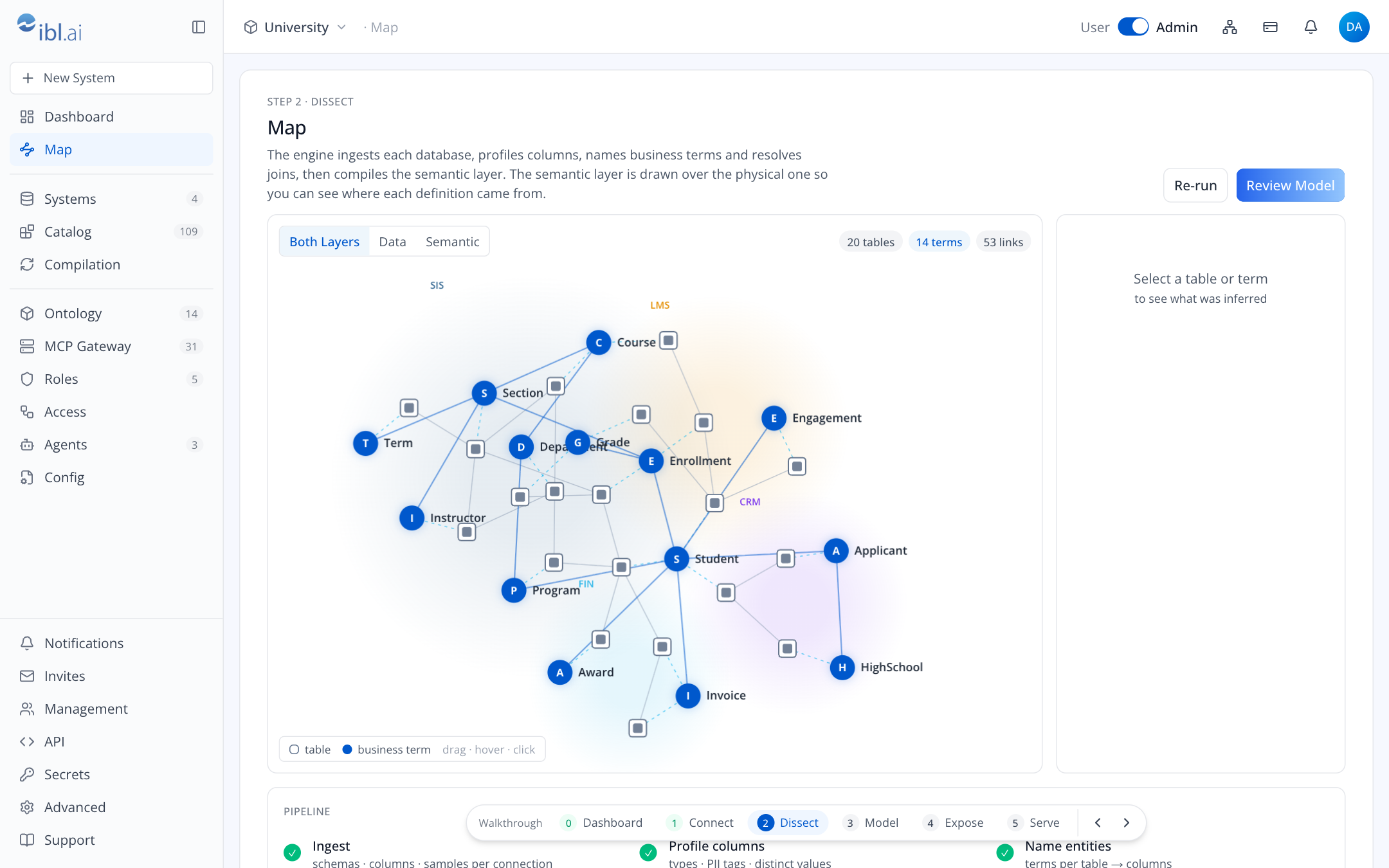
All in docs/screenshots/, one per page and tab: Dashboard · Systems · Systems · HTTP API · Map · Ontology · MCP Servers · New MCP Server · Server · Connect · Server · Playground · Server · Activity · Server · Tokens & Origins · Agents · Roles · Access · Catalog · Compilation · Config · Notifications · Collapsed Sidebar · Organization Menu · Management Dialog · Phone · Phone Menu
Repository layout
The repository root is the Next.js 16 console in the ibl.ai shell (os.ibl.ai header and sidebar,
Open Sans, #0058cc).
| Path | What it is |
|---|---|
app/(app)/* | One folder per console route: dashboard, systems, map, ontology, mcp, mcp/new, mcp/[slug], agents, roles, access, catalog, sync (Compilation), config |
components/shell/ | Sidebar, header, page primitives, shell state, the OS-style footer dialogs hosting SDK tabs and the prototype walkthrough stepper |
components/graph/ontology-graph.tsx | Canvas force graph used on the Map |
components/ui/ | shadcn components (base-nova on Base UI) |
lib/iblai/, store/, app/(auth)/ | ibl.ai SSO: session, SDK store, sign-in callback |
lib/host/, app/api/host/ | The host layer: checks the caller with ibl.ai, proxies the platform's engine, writes its server configs and runs one Toolbox process per server |
lib/host/engine-key.ts | The server's own engine key: signs in as the engine's admin, makes a key and keeps it in $ONTOLOGY_HOME/engine-key |
lib/host/models.ts, app/internal/models/v1/ | The loopback model route the engine calls: swaps in the OpenAI model, adds OPENAI_API_KEY and sends the call on |
instrumentation.ts | The start-up check: a server with AO_URL and no ONTOLOGY_PLATFORM refuses to start |
lib/host/relay.ts | On the pages-only console, forwards each /api/host/* call to the server the browser names |
lib/server-address.ts | The x-ontology-server header, a server's address https://<host>/iblai, and the browser's store of it per platform |
app/[platform]/[slug]/mcp/ | The gateway agents call: origin, credential and toolset checks, then Toolbox |
lib/data.ts, lib/ibl-flows.ts | What each page reads and does; the ibl.ai writes (roles, policies, API keys, agents) |
lib/mock.ts | The fixed data demo mode shows |
deploy/compose.yaml | What Docker runs on a server: NVIDIA's engine as its own published images, Postgres, Caddy and the four generated secrets; the console's image under the console profile |
deploy/iblai-ontology.service | The systemd unit of a console built from source on the server (docs/install.md) |
deploy/install.sh | Optional: prepares an Ubuntu server and installs the console as an image (docs/operations.md) |
deploy/auto-ontology.override.yml | For development: runs a local checkout of the engine on the host's network, on loopback, its web app on 3100; not part of a release |
Dockerfile | The console's image, public.ecr.aws/ibleducation/iblai-ontology: Next's standalone build of the whole console with the Toolbox binary; the ibl.ai addresses are build arguments |
.github/workflows/release.yml | On every push to main: release-it for the version and the changelog, then a draft release with the install files |
.env.example | Environment settings |
scripts/screenshots.mjs | Regenerates every screenshot in docs/screenshots/ |
scripts/audit-layout.mjs | Checks every page at six widths for overflow, overlap and sideways scrolling |
providers/iblai-providers.tsx | ibl.ai SSO provider chain (see docs/auth.md) |
AGENTS.md | Rules for coding agents, written by next dev; keep it committed |
docs/ | The documents above |
.claude/launch.json | Dev-server definition for the Claude desktop preview |